
Thermal Paste
$20.00
Thermal paste, also known as thermal compound or grease, is a crucial material applied between a computer’s processor (CPU/GPU) and its heatsink to ensure efficient heat transfer. It fills microscopic air gaps, improves cooling, and enhances overall system performance and lifespan.
When building, repairing, or upgrading a computer, most people focus on major components such as the processor, graphics card, or RAM. However, one of the smallest and least noticeable materials inside a computer case plays a massive role in maintaining performance and stability — thermal paste. Often overlooked by beginners, thermal paste is essential for keeping processors cool, preventing overheating, and ensuring hardware longevity.
🔹 What is Thermal Paste?
Thermal paste, sometimes called thermal compound, thermal grease, or TIM (Thermal Interface Material), is a conductive substance that improves heat transfer between two surfaces — usually a CPU or GPU and the heatsink/fan that sits on top of it.
The surfaces of a processor and a heatsink may look perfectly smooth to the naked eye, but under a microscope, they have tiny imperfections, scratches, and air gaps. Since air is a poor conductor of heat, these gaps prevent efficient cooling. Thermal paste fills those microscopic spaces, creating a smooth bridge for heat to transfer from the CPU to the cooler.
Without thermal paste, even the best cooling systems cannot function properly, and the CPU can overheat within seconds.
🔹 Why is Thermal Paste Important?
The main purpose of thermal paste is efficient heat dissipation. Processors generate significant heat while performing tasks. If this heat is not removed quickly, the system may throttle performance or even shut down to prevent damage.
Here are some key benefits:
Prevents Overheating – Ensures your CPU and GPU remain at safe operating temperatures.
Improves Performance – A cooler processor can run at higher speeds without throttling.
Increases Hardware Lifespan – Reduces stress on components caused by heat.
Enables Stable Overclocking – Gamers and power users rely on quality thermal paste to safely push their CPUs and GPUs beyond factory speeds.
🔹 Types of Thermal Paste
Not all thermal pastes are the same. They vary in composition, conductivity, and longevity. Here are the main types:
Metal-Based Thermal Paste
Contains fine particles of metals like silver or aluminum.
Offers excellent thermal conductivity.
Highly efficient but electrically conductive, so care must be taken during application.
Ceramic-Based Thermal Paste
Made from ceramic powders mixed with silicone.
Non-conductive, safe for beginners.
Good performance but not as high as metal-based pastes.
Carbon-Based Thermal Paste
Uses carbon micro-particles for conductivity.
Offers great thermal performance without electrical conductivity risks.
Often preferred by professionals.
Liquid Metal Thermal Paste
Made with gallium-based alloys.
Extremely high thermal conductivity (best for enthusiasts and overclockers).
Electrically conductive and corrosive to aluminum, requiring careful application.
🔹 How to Apply Thermal Paste Properly
Correct application is critical. Using too much or too little thermal paste can reduce effectiveness.
Steps to apply thermal paste:
Clean the surface – Remove old paste from the CPU and heatsink using isopropyl alcohol and a lint-free cloth.
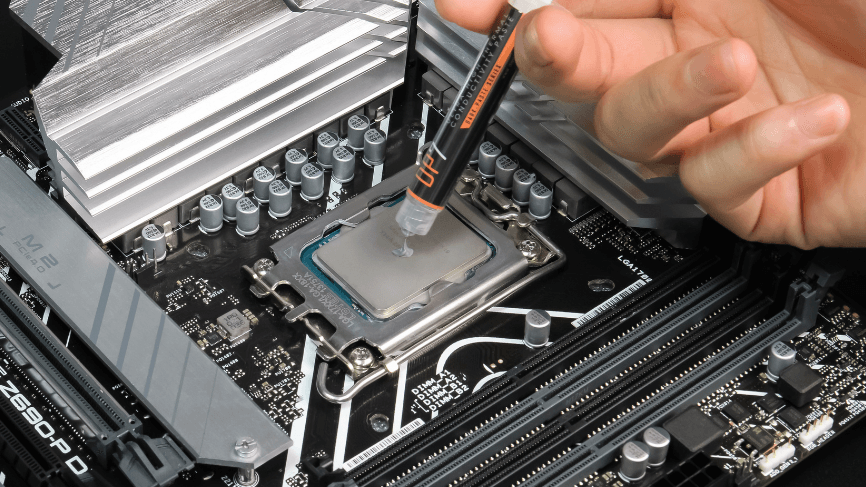
Apply a small amount – Usually, a pea-sized drop in the center of the CPU is sufficient.
Mount the cooler – When you press the heatsink onto the CPU, the paste spreads evenly across the surface.
Avoid over-application – Too much paste can spill over, creating mess and reducing efficiency.
🔹 How Often Should You Replace Thermal Paste?
Thermal paste does not last forever. Over time, it can dry out, crack, or lose efficiency. Generally:
Every 2–3 years for normal usage.
Every 1–2 years for gaming/overclocked systems.
Immediately if you remove your CPU cooler (since breaking the seal affects performance).
Signs you need to replace thermal paste:
Higher-than-usual CPU/GPU temperatures.
Random system shutdowns or throttling.
Visible dry or cracked paste during inspection.
🔹 Choosing the Right Thermal Paste
When selecting thermal paste, consider the following:
Thermal Conductivity Rating (W/mK) – Higher values mean better heat transfer.
Electrical Conductivity – Beginners should avoid electrically conductive pastes.
Ease of Application – Some pastes are thicker and harder to spread.
Durability – Check how long it lasts before reapplication is needed.
Popular brands include Arctic Silver, Noctua NT-H1, Thermal Grizzly Kryonaut, and Cooler Master MasterGel.
🔹 Myths About Thermal Paste
“More paste is better.” – Wrong. Too much paste insulates rather than conducts.
“Thermal paste lasts forever.” – It degrades with time and heat cycles.
“Any paste works the same.” – Performance varies greatly depending on type and quality.
“You don’t need it if your cooler is strong.” – Even the best cooler is useless without thermal paste.
🔹 Thermal Paste in Gaming & Overclocking
For gamers and professionals, thermal paste can be the difference between smooth performance and frustrating crashes. Overclockers, in particular, rely on high-end pastes like liquid metal to push CPUs to extreme limits while keeping temperatures safe.
A small investment in good thermal paste ensures your expensive CPU or GPU works at maximum potential without overheating.
🔹 Conclusion
Though it may seem insignificant compared to a powerful processor or a high-end graphics card, thermal paste is a silent hero inside every computer. By ensuring efficient heat transfer, it keeps systems cool, stable, and long-lasting. Whether you are a gamer, a professional, or just someone who wants their computer to run smoothly, never overlook the importance of applying the right thermal paste correctly.
In short, thermal paste is not just an accessory — it is a necessity for every computer build. With proper application and timely replacement, it ensures that your machine runs at its best, protecting your investment and delivering reliable performance for years to come.
Reviews
There are no reviews yet.